
Outmin vs QuickBooks: The complete QuickBooks alternative 2026

Quick comparison: Outmin vs QuickBooks
Factor

QuickBooks
Why decades-old software architecture shapes modern bookkeeping
This worked brilliantly when the alternative was paper ledgers. But today's practices operate at digital speed with portfolio complexity, while bookkeeping delivery still follows 1980s logic – software that requires people to use it.
Even the most advanced QuickBooks setup still requires staff to code transactions, chase clients for documents, reconcile accounts manually, and compile reports. It's powerful accounting software, but it's still software that needs bookkeepers to operate it.
The constraint isn't the software's capability. It's the labour dependency built into the model.
The autonomous alternative: When bookkeeping does itself
- How accounting software works:
Client generates financial data → Staff inputs it into QuickBooks → Staff categorises and reconciles → Staff generates reports → Practice delivers to client - How autonomous infrastructure works:
Client generates financial data → Rex™ captures it automatically → Rex™ processes and reconciles continuously → Finance experts verify edge cases → Practice receives finished books
The difference isn't the quality of tools. It's whether humans do the work or the system does it autonomously.
The practical difference
The work gets done without people doing it.
Work done, without doing the work
Features & functionality: A misleading comparison?
That’s because QuickBooks is built around a DIY software model. It gives you tools (lots of them), but you or your team do the work: input data, chase suppliers, reconcile transactions, run reports, fix errors.
Outmin doesn’t offer tools. It does the job. It’s a fully managed system built to replace manual bookkeeping, not assist it. So instead of asking “which has more features,” the better question is: Do you want to do the work yourself, or have it done for you?
QuickBooks: SaaS accounting tools
Outmin: Autonomous Bookkeeping
- Advanced invoicing with custom templates and payment tracking
- Multi-currency support with real-time exchange rates
- Inventory management with cost tracking and reorder points
- Project profitability analysis and time tracking integration
- 65+ standard reports plus custom report builder
- 750+ third-party integrations and API access
- Payroll processing and tax preparation assistance
- Advanced budgeting and forecasting tools
- Rex Collect
Connects to banks, suppliers, sales platforms, payment processors automatically. - Rex Process
Reads documents, codes transactions, applies VAT rules autonomously - Rex Reconcile
Matches bank, AR, AP, VAT, payroll continuously - Rex Close
Maintains ready-close state, period validation - Rex Requests
Requests missing docs or context in-app - Practice View
Portfolio dashboard with reconciliation monitoring - Business View & Mobile
Daily cash insights, receipt uploads, financial visibility - Expert verification
Finance team reviews edge cases
- Upload and categorise transactions manually
- Reconcile bank feeds and resolve discrepancies
- Chase suppliers for missing invoices and documents
- Set up and maintain all integrations yourself
- Generate and interpret reports for business insights
- Manage compliance and tax preparation workflows
- Upload one-off docs via mobile or desktop (if needed)
- Everything else happens automatically
Manage your business, not software

The real cost analysis: SaaS vs AI-native
QuickBooks: The iceberg pricing model
QuickBooks: The Iceberg Pricing Model
- Simple Start: €18/month
- Essentials: €26/month
- Plus: €37/month
- Advanced: €70/month
Hidden Costs (What You Don't):
- Document Management:
Dext or similar (€30-40/month) - Bookkeeping Labour:
10-15 hours monthly at €25-50/hour (€250-750/month) - Accountant Consultation:
Quarterly reviews and error fixing (€200-500/quarter) - Your Time:
5-10 hours monthly in management overhead (€200-500/month valued time) - Error Costs:
Mistakes in categorisation, missed deductions, compliance issues (€500-2000/year)
Realistic Monthly Total: €500-3,000+
- A fixed Platform fee per client
- Rex automation (calculated per processed document)
- People doing reconciliations
- People fixing coding mistakes
- People chasing documents
- People preparing VAT from messy records
Result: Practices and SMEs typically save significantly vs. QuickBooks + Dext + labour
Your time is worth infinetly more
Integrations: Different philosophies for Outmin vs QuickBooks
QuickBooks: User-friendly in theory, demanding in practice
QuickBooks Online (QBO) is marketed as intuitive, but users frequently report that real-world usage is more complex than expected. Across forums like Reddit and user review platforms, common complaints include navigation friction, slow load times, and disrupted workflows.
- On Reddit, users describe basic actions, like viewing a customer record, as requiring workarounds such as “refreshing data in settings” to make updated information appear.
- Many long-time users transitioning from QuickBooks Desktop say the Online version feels like a downgrade, with more steps required for tasks that were previously simple. Several posts mention frustration with "buried" features and unnecessary clicks for daily actions.
- On Capterra and Trustpilot, reviews often praise QuickBooks for its feature breadth, but the same reviews point out steep learning curves, poor onboarding, and cluttered menus that can overwhelm non-accountants.
Performance issues also emerge regularly. Users report browser freezing, slow response during peak times, and issues with syncing bank data or accessing reports. While QuickBooks Online does offer mobile apps and cloud accessibility, the trade-off is a heavier reliance on internet stability and more frequent UI changes.
In practice, QuickBooks Online requires significant hands-on management. Users must stay on top of categorisation, reconciliation, document uploads, and ongoing troubleshooting, adding to the daily admin load.
Outmin: Designed for minimal user interaction
Outmin takes the opposite approach. Rather than giving users tools to do bookkeeping themselves, it removes that responsibility entirely.
- Users don’t need to match transactions, enter invoice details, or manage bank feeds. Rex™ Collect retrieves financial data directly from banks, POS systems, supplier portals, and payroll providers.
- Most businesses only interact with Outmin to upload occasional one-off documents via mobile or desktop. Everything else flows in and is processed automatically.
- The platform is designed for visibility, not action.
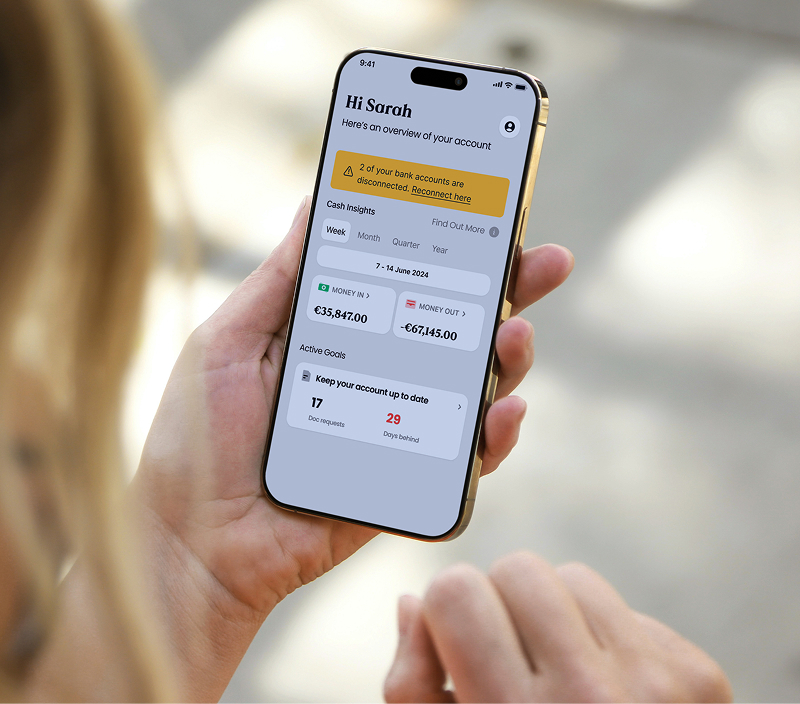
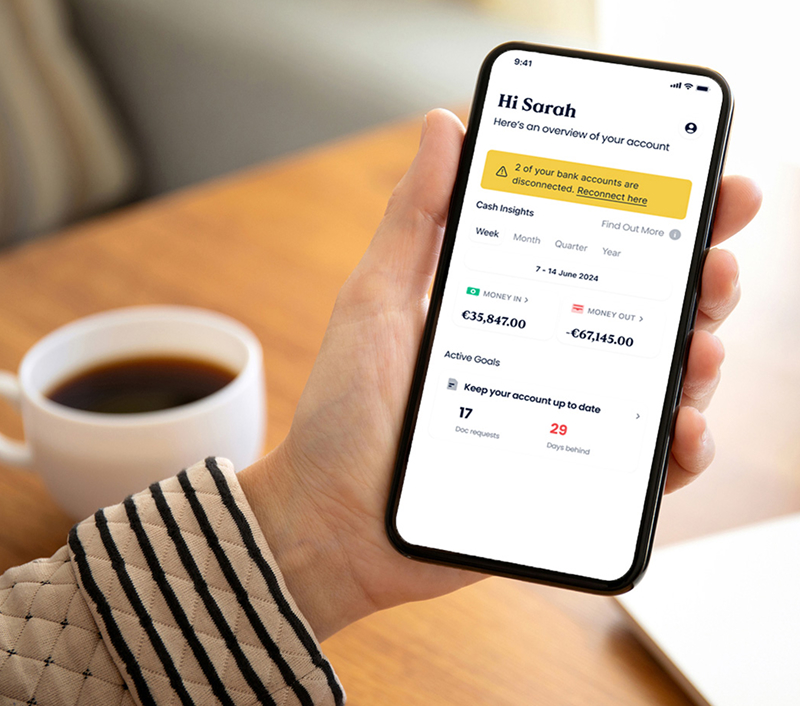
- On the Business View, business owners can log in to view real-time summaries (money in, money out, suppliers, VAT, etc.), with minimal clicks and no manual setup. Exceptions and flagged items are surfaced clearly, without requiring users to dig through menus or fix issues themselves.
- On the Practice View, accountants get instant oversight across every client – reconciliations, processed documents, exception flags, and ledger activity. Instead of opening multiple systems or asking for updates, everything is visible from a single dashboard. No chasing, no status meetings, no digging for supporting documents. The work is already done, and the data is already clean.
Integrations: Different philosophies for Outmin vs QuickBooks
QuickBooks
This multi-tool approach can also lead to inconsistent data or broken connections, especially if external apps update or change permissions.
Businesses often find themselves manually fixing duplicate transactions, lost receipts, or failed reconciliations that arise from mismatched integrations.
Outmin
There’s no need to manage third-party tools or ensure they’re syncing properly. Data is pulled automatically, processed intelligently, and checked by Rex™, Outmin’s engine, without manual setup.
For teams tired of maintaining a complex web of accounting tools, this difference is significant. Outmin removes the integration burden entirely by replacing the entire stack.
Customer Support
QuickBooks: Support channels in place, but frustrations persist
QuickBooks offers a full suite of support options: live chat, phone lines, a large help centre, and community forums. But many users report that the actual experience falls short of expectations.
- On review sites like Trustpilot, user sentiment is inconsistent. While the UK-specific domain for QuickBooks shows a 4.2-star rating, the main quickbooks.com page (unclaimed by Intuit) has a much lower 1.3-star average, mostly reflecting issues with support, billing, and technical resolution.
- On ConsumerAffairs, QuickBooks has a 1.1-star rating, with frequent mentions of unhelpful support interactions and difficulty reaching someone who can resolve issues.
- On Reddit and other user forums, small business owners often share frustrations about long wait times, chatbots that don’t escalate properly, and being passed between teams when problems span across banking, payroll, or account settings.
Even with all the right channels in place, support remains the most consistent pain point for many users, especially when something out of the ordinary occurs.
Outmin: Fewer issues, direct help
- One consistent point of contact per account
- Support channels via email or in-app messaging
- Real-time visibility into missing documents, bank feed issues, or flagged transactions
- No handoffs between departments or reliance on chatbots
- Support is included by default, not gated behind pricing tiers
When Outmin vs QuickBooks makes sense
Choose QuickBooks if…
You want to run bookkeeping inside your firm or inside the business and you’re comfortable doing the hands-on work.
For accounting firms:
- You want your team to perform manual processing and reconciliation
- You’re happy using QuickBooks as a bookkeeping tool, not a finished-output provider
- Your clients have low-volumes and minimal reconciliation needs
- You’re willing to manage multiple systems (QuickBooks + Dext + email + spreadsheets)
- You have capacity to chase documents, handle matching, and fix errors
For SMEs directly:
- You have someone in-house handling bookkeeping tasks
- You prefer to actively manage categories, match payments, upload documents
- You’re comfortable with the learning curve and ongoing admin
QuickBooks works if your team accepts the workload, and you want a traditional bookkeeping environment.
Choose Outmin if…
You want bookkeeping to happen autonomously, with clean ledgers, daily verification, and no manual intervention.
For accounting firms:
- You want clean, reconciled outputs without doing the processing
- You want to scale client capacity without hiring more bookkeepers
- You prefer real-time Practice View oversight rather than doing the work yourself
- You want VAT-ready ledgers, not drafts needing clean-up
- You want one system instead of multiple disconnected tools
For SMEs directly:
- You want everything handled for you without touching software
- You need receipts, invoices, and bank data collected automatically
- You want simple financial clarity without categorising, matching, or chasing
- You want predictable accuracy and visibility without the admin burden
Outmin is built for practices who want clean books delivered automatically, and businesses who want clarity without doing bookkeeping.
Made for those ready to stop bookkeeping


Final thoughts
QuickBooks is a widely used accounting software with deep functionality. It can be a good fit for practices that want to manage bookkeeping delivery with software and staff, and have the capacity to handle manual work across their client portfolio. But that control comes with costs: staff salaries, training overhead, month-end bottlenecks, and growth constrained by hiring ability.
Outmin takes a fundamentally different approach. It's not software you manage, it's autonomous infrastructure that does the work. With Rex™ handling collection through close, expert verification for edge cases, and no software stack to coordinate, it replaces the traditional delivery model (software + tools + bookkeeping staff) with autonomous bookkeeping.
If you're looking to scale without hiring constraints, get partners out of delivery, and transform bookkeeping from labour-intensive to autonomous, Outmin is worth serious consideration.
Ready to eliminate manual bookkeeping?

FAQ’s
Outmin is autonomous bookkeeping infrastructure that does the work itself. Sage is accounting software that provides tools for manual bookkeeping. Outmin replaces Sage, Dext, and bookkeeping staff in one integrated system with Rex™ handling collection through close autonomously.
Yes. Many practices start by using Outmin for select clients (especially high-transaction sectors like hospitality and retail). Outmin can replace Sage for those clients or run in parallel during transition. Practices retain control over VAT submissions, year-end accounts, and advisory services.
Outmin's platform fee (€39/£29/client/month) plus usage-based Rex™ pricing is higher than QuickBooks alone. However, QuickBooks requires Dext, bookkeeping staff salaries (€30k-50k+), training overhead, and partner review time. Practices typically report 25% lower bookkeeping costs per client with Outmin.
Yes. Outmin replaces QuickBooks, Dext, and bookkeeping staff for client delivery. Practices get finished books reconciled daily, VAT workings ready for review, and complete visibility through Practice View.
Yes. Many practices start with Outmin for select clients (especially high-transaction sectors) while keeping existing clients on QuickBooks. Outmin can replace QuickBooks entirely or run in parallel during transition.
QuickBooks requires setup, integration configuration, staff training, and ongoing management. Outmin handles client onboarding (typically 2-3 weeks), connects data sources, and begins autonomous processing. Practices pilot with 1-3 clients first, then phase in portfolio over 3-6 months.
Outmin provides all standard bookkeeping outputs automatically: General Ledger, Trial Balance, P&L, Balance Sheet, VAT Workings, AP/AR ledgers, reconciliation reports. Practices export data as needed for advisory work. Discuss unique requirements during your demo.
Yes. Outmin is often used instead of QuickBooks by businesses that prefer not to do their own bookkeeping. It gives you daily financial updates, real-time reporting, and expert-managed accuracy without needing accounting software.