Outmin vs Sage: The Sage alternative guide for businesses in 2026

Outmin vs Sage: Comparison overview
Feature

Sage
Sage is: Reliable, but resource-intensive
But Sage isn’t a modern automation solution. It’s a powerful toolkit - one that assumes you’ll be doing the work.
Practices are expected to have staff input and categorise transactions, manage client documents, reconcile bank feeds, compile VAT workings, and handle month-end close. Some features can be partially automated, but most workflows still rely on manual bookkeeping work.
Outmin is: autonomous bookkeeping infrastructure
This Sage alternative replaces the entire bookkeeping stack: software, tools, and labor. Rex™ connects directly to banks, suppliers, sales platforms, payment processors, and payroll systems. It collects documents, processes transactions, reconciles continuously, and maintains ready-close books without manual work.
There's no software for staff to operate, no integrations to maintain, no transaction coding required. Outmin replaces Sage, Dext, and bookkeeping staff with autonomous infrastructure.
Rex™'s autonomous processing, combined with expert verification for edge cases, eliminates manual bookkeeping delivery entirely.
Features & Functionality
Sage: Software for hands-on users
- Accounts Payable & Receivable Create and manage invoices, track payments, and chase outstanding balances manually.
- Bank Reconciliation Connect bank feeds and match transactions yourself. Exceptions must be reviewed and resolved manually.
- AutoEntry Capture invoices and receipts with OCR, but volume is limited by your plan.
- Reporting Access P&L, cash flow, and balance sheet reports (setup and interpretation are up to you.)
- VAT & Tax Supports VAT submissions and self-assessment, with options to file directly through HMRC.
- Stock & Multi-Currency Available on higher-tier plans.
- Mobile App Create invoices and upload receipts, but most tasks still require desktop access.
Outmin: Work done for you, not by you
- Rex Collect
Connects directly to banks, suppliers, sales platforms, payment processors. Documents flow in automatically via portals, email, and mobile without chasing - Rex Process
Reads documents with custom OCR, extracts line-level detail, applies chart of accounts and VAT rules, detects duplicates, posts ledger entries autonomously - Rex Reconcile
Matches bank transactions, reconciles AR/AP, validates VAT, verifies payroll, maintains control accounts continuously. Discrepancies flagged immediately, anomalies routed to experts - Rex Close
Runs period completeness checks, validates ledger integrity, maintains ready-close state continuously - Rex requests
Requests missing documents or context directly from clients in-app. Practices see conversations without being involved - Practice View
Multi-client dashboard showing reconciliation status portfolio-wide. Drill down to any transaction, access source documents instantly - Business View & Mobile App
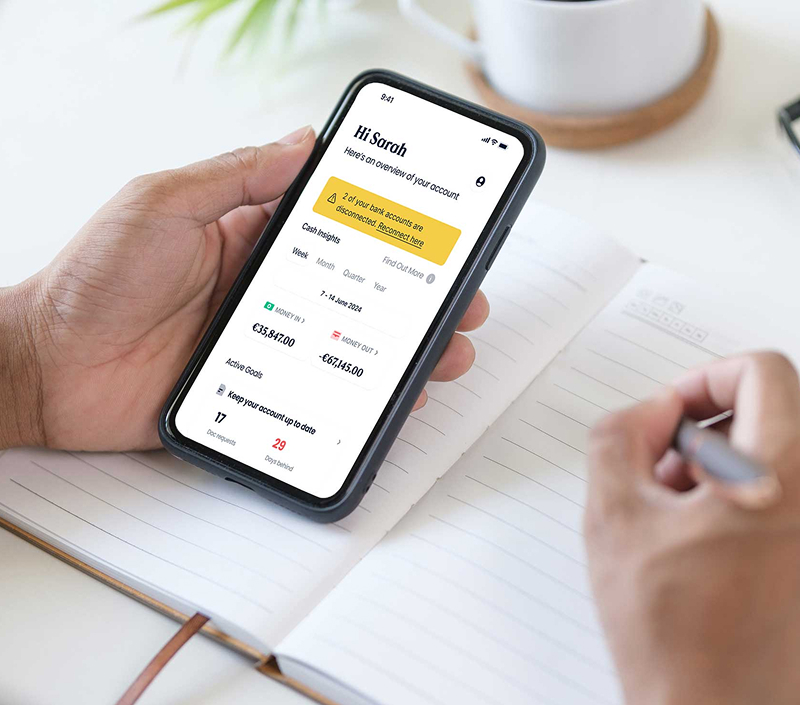
Daily cash insights, P&L, receipt uploads via photo, supplier/customer visibility. Minimal input, maximum visibility - Expert verification
Outmin's finance team reviews Rex™'s work when professional judgment needed
Books, done without you lifting a finger
Integration philosophy: Add-on ecosystem vs built-in system
Sage
For larger businesses, Sage Intacct offers a separate, more advanced marketplace with over 350 integrations across payroll, ERP, analytics, and CRM platforms like Salesforce.
You can connect to hundreds of apps, but guess who's responsible for researching, setting up, and maintaining all those connections? (Spoiler alert: you, not them.)
Every integration means more complexity, more potential failure points, and more time spent playing IT manager instead of business owner.
Outmin
There are no apps to install or manage, and no syncing issues to fix. Financial data flows in automatically and is processed by Rex™, not the user. It’s a fully contained system designed to reduce friction, not increase it.
Takeaway: With Sage, you're responsible for stitching the system together. With Outmin, it’s already built and running (no bolt-ons needed).
Stop playing IT manager
User experience: Hands-on vs hands-off
Sage
Sage: Powerful but demanding
Sage’s user experience depends heavily on the product version. The cloud-based version (Sage Business Cloud Accounting) is more modern and accessible, while Sage 50 (desktop) offers deeper functionality at the cost of usability. For both, setup, navigation, and day-to-day use require time and accounting familiarity.
What users like:
- Deep reporting tools once set up correctly
- A broad range of features for managing different business workflows
- Strong fit for accountants and finance pros who prefer full control
What users find difficult:
- Setup can be time-consuming and requires accounting knowledge
- Interface is often described as “clunky” or “dated”
- Navigation isn’t always intuitive, with steep learning curves for non-finance users
- Manual tasks like reconciliation, data entry, and corrections are still the norm
- Features can feel excessive for small businesses with simple needs
Even seasoned professionals acknowledge that Sage can feel like overkill for smaller teams or those without internal finance expertise. The power is there, but so is the workload.
Outmin: Made for monitoring, not managing
This Sage alternative eliminates software operation entirely. The user experience is built around viewing results rather than doing work:
For practices (Practice View):
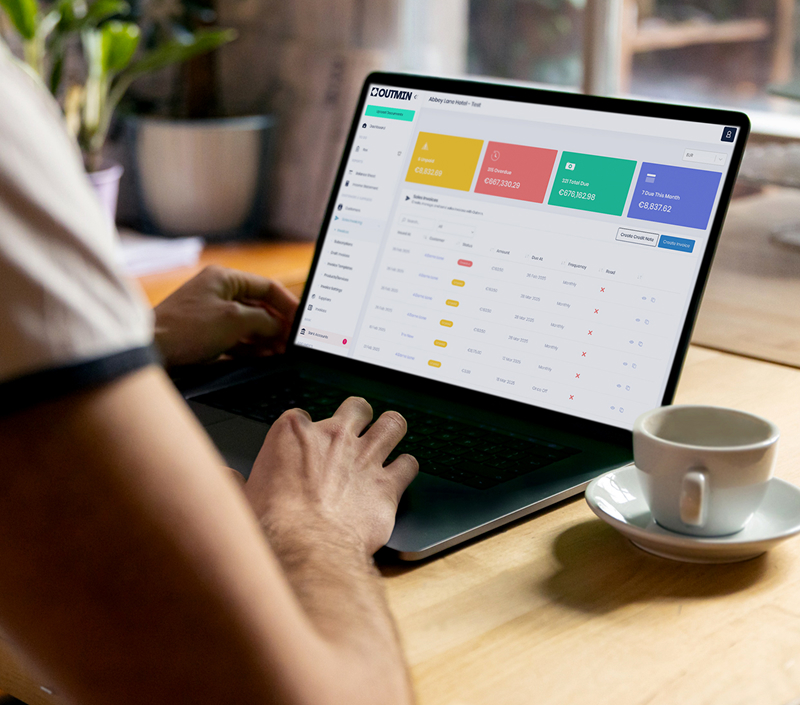
- Dashboard-first interface
See reconciliation status across all clients at a glance, no layered menus - Instant drill-down
Click any transaction to see source documents and reconciliation details - No configuration required
No chart of accounts setup, no integration management, no system maintenance - Read-only by design
Monitor portfolio status without needing to operate software or manage workflows - Exception-based interaction
Only engage when Rex™ flags something requiring professional judgment
For businesses (Business View & Mobile):
- Minimal interface
Daily cash insights, P&L, and key metrics without accounting complexity - View-only financial data
See current position without inputting or categorising transactions - Simple interactions
Upload receipts via photo, respond to Rex™ Resolve requests in seconds - No software learning curve
Financial visibility without understanding accounting software - Mobile-first design
Check cash flow and upload documents from phone
The experience: practices monitor portfolio health without operating software, businesses see their numbers without doing bookkeeping.
Pricing: What you really pay for
Sage Accounting
Sage pricing (2025)
Sage Accounting offers two main tiers:
- Accounting Start: €17/month + VAT
For sole traders or freelancers (single user). Includes invoicing, bank reconciliation, and VAT returns. - Accounting: €34/month + VAT
For growing businesses. Adds multi-user access, advanced reports, cash flow forecasting, receipt capture, inventory, and multi-currency support.
Payroll is an additional €13/month + VAT for 5 employees (offer price).
At face value, these prices look attractive. But they don’t include the costs of:
- Document capture tools (Dext or AutoEntry)
- Bookkeeping staff to code transactions, reconcile accounts, compile VAT workings
- Training and retention overhead
- Partner time reviewing bookkeeping work
- Month-end capacity bottlenecks
For a practice with 50 bookkeeping clients, this means €500-900/client/year in software plus multiple bookkeepers' salaries plus training plus partner review time. The more your practice grows, the more these costs scale with headcount.
Outmin pricing
Outmin replaces the entire bookkeeping stack (software + tools + labour) with autonomous infrastructure.
Pricing has two components:
- Platform access: Per client/month
Includes Practice View (portfolio dashboard), Business View & Mobile (business owner portal), all data connections, unlimited storage, unlimited users. - Rex bookkeeping: Usage-based
Calculated on documents processed per business
Includes autonomous collection, processing, reconciliation, period close, and expert verification. Volume discounts available for practices with multiple clients.
There are no extra fees for expert review, no third-party app subscriptions, no bookkeeping staff salaries, and no training overhead.
Practices typically report 25% lower bookkeeping costs per client while eliminating hiring constraints and improving capacity.
Scale output not headcount

Scalability: Can it grow with you?
Sage
Support: DIY vs partnership
Sage: Structured help, mixed experiences
Sage offers multiple support channels: live chat, email, phone, a help centre, and Sage University for training. These resources are broad, especially for new users.
However, reviews frequently mention:
- Long wait times for live support
- Inconsistent experiences across products (cloud vs desktop)
- Frustrations with system errors, billing issues, or delayed resolutions
While Sage does provide real-time assistance on higher-tier plans, users say the quality of help can vary depending on who you get and how complex the issue is.
- Dedicated partnership manager for onboarding, training, and ongoing support
- Technical implementation handled by Outmin team
- Practice-level analytics and portfolio monitoring
- Fast response times via email and in-platform messaging
- Outmin's finance team reviews Rex™'s work when professional judgment needed
- Edge cases verified before delivery to practices
- Exceptions flagged and resolved proactively
- No staff training required (autonomous infrastructure, not software to operate)
When Sage vs Outmin makes sense
Sage can be a fit for practices that want to manage bookkeeping delivery with software and staff, and have capacity to support that model.
It might suit your practice if:
- You have bookkeeping staff capacity with no hiring constraints
- Partners are willing to stay involved in reviewing bookkeeping work
- Your client portfolio is small with no aggressive growth plans
- Staff enjoy operating accounting software and managing manual workflows
- You need desktop software with local data control (e.g. Sage 50)
- Month-end capacity crunches are manageable
- Bookkeeping margins are healthy with no pressure to improve economics
Sage offers flexibility and functionality, but requires ongoing staff management, training, and coordination to deliver bookkeeping services.
Outmin is designed for practices ready to eliminate manual bookkeeping delivery and scale without hiring constraints.
It's a good fit if:
- Growth is constrained by hiring ability
- Partners need out of delivery work entirely
- Bookkeeping margins need improvement
- Month-end creates capacity chaos across your practice
- You want to add 50+ clients without adding bookkeepers
- Quality needs to be consistent across entire portfolio regardless of scale
- Clients need better service (daily updates, instant visibility)
- You're looking for the best alternative to Sage that replaces manual delivery entirely
Outmin replaces the traditional bookkeeping stack (software + tools + staff) with autonomous infrastructure that delivers finished books without manual work.

The bottom line
Sage and Outmin represent two fundamentally different operational models.
Sage gives you accounting software. It's powerful, but relies on staff to code transactions, chase clients, reconcile accounts, and compile reports. Growth requires hiring more bookkeepers.
Outmin gives you autonomous infrastructure. It replaces software, tools, and labor with Rex™ handling bookkeeping autonomously. Practices get finished books without doing the work, without hiring constraints.
The real question isn't which software has more features. It's whether you want to manage bookkeeping delivery or eliminate it entirely.
Ready to cut bookkeeping complexity?
FAQ’s
Outmin is autonomous bookkeeping infrastructure that does the work itself. Sage is accounting software that provides tools for manual bookkeeping. Outmin replaces Sage, Dext, and bookkeeping staff in one integrated system with Rex™ handling collection through close autonomously.
Yes, especially for small businesses that want bookkeeping done for them rather than managing software themselves. Outmin provides daily financial visibility without needing to operate software, code transactions, or reconcile accounts manually.
Yes. Outmin performs document collection, transaction processing, reconciliation, and period close all autonomously. No need for separate tools or bookkeeping staff.
Outmin's platform fee (€39/£29 business/month) plus usage-based Rex™ pricing is higher than Sage's software subscription alone. However, Sage requires Dext, bookkeeping staff salaries, training, and partner review time. Practices typically report 25% lower bookkeeping costs per client with Outmin.
No integration setup required. Rex™ connects directly to banks, suppliers, sales platforms, payment processors, and payroll systems without configuration or maintenance.
Yes. Many practices start by using Outmin for select clients (especially high-transaction sectors like hospitality and retail). Outmin can replace Sage for those clients or run in parallel during transition. Practices retain control over VAT submissions, year-end accounts, and advisory services.