
A deep dive into line-level VAT review, issue flagging, and full document traceability inside Practice View.
VAT is different from most bookkeeping tasks. Your practice can delegate the day-to-day processing, but the responsibility for filing accurately still sits with you. That makes visibility into what's going into each return especially important.
And yet, for a lot of practices, VAT review still involves spreadsheets exported from internal tools, emailed back and forth, with no easy way to flag issues or track what's been resolved.
We've brought VAT review into Practice View, the practice-facing side of Outmin's Autonomous Bookkeeping Platform. Your firm can now see every line item going into a return, flag anything that looks wrong, and track issues to resolution. All inside the product.
This post also covers All Documents, another feature in Practice View that gives your practice a complete, searchable audit trail of everything that's flowed through the system.
The two are closely connected: confident VAT filing depends on confident document traceability.
VAT in Practice View: the overview
When you open the VAT tab for any client, you see a table of all VAT periods. Each row shows:
- Period dates. The from and to dates for each filing period.
- Filing date. When the return was filed, if it has been.
- Status. Filed or Not Filed. Clear and immediate.
- VAT document. For filed periods, you can view the receipt from Revenue directly in the product.
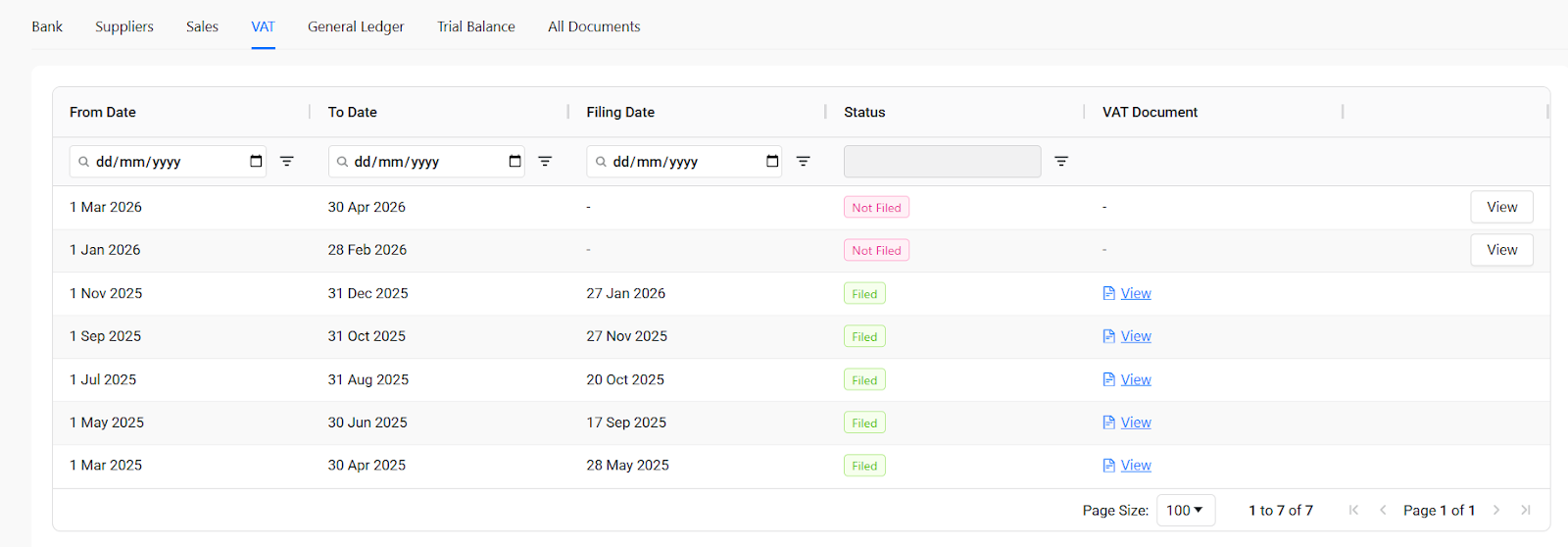
This gives you a complete filing history at a glance. You can see which periods are done, which are pending, and access the supporting documentation for anything that's already been submitted.
Reviewing a return line by line
Click View on any period and you're inside the return. This is where the real value is.
At the top, you see four summary cards:
- All Items. The total number of line items in the return. For a typical client, this can be several hundred.
- Open Issues. Items that have been flagged and are waiting to be resolved.
- In Review. Items currently being looked at by the Outmin team.
- Closed Issues. Flags that have been resolved.
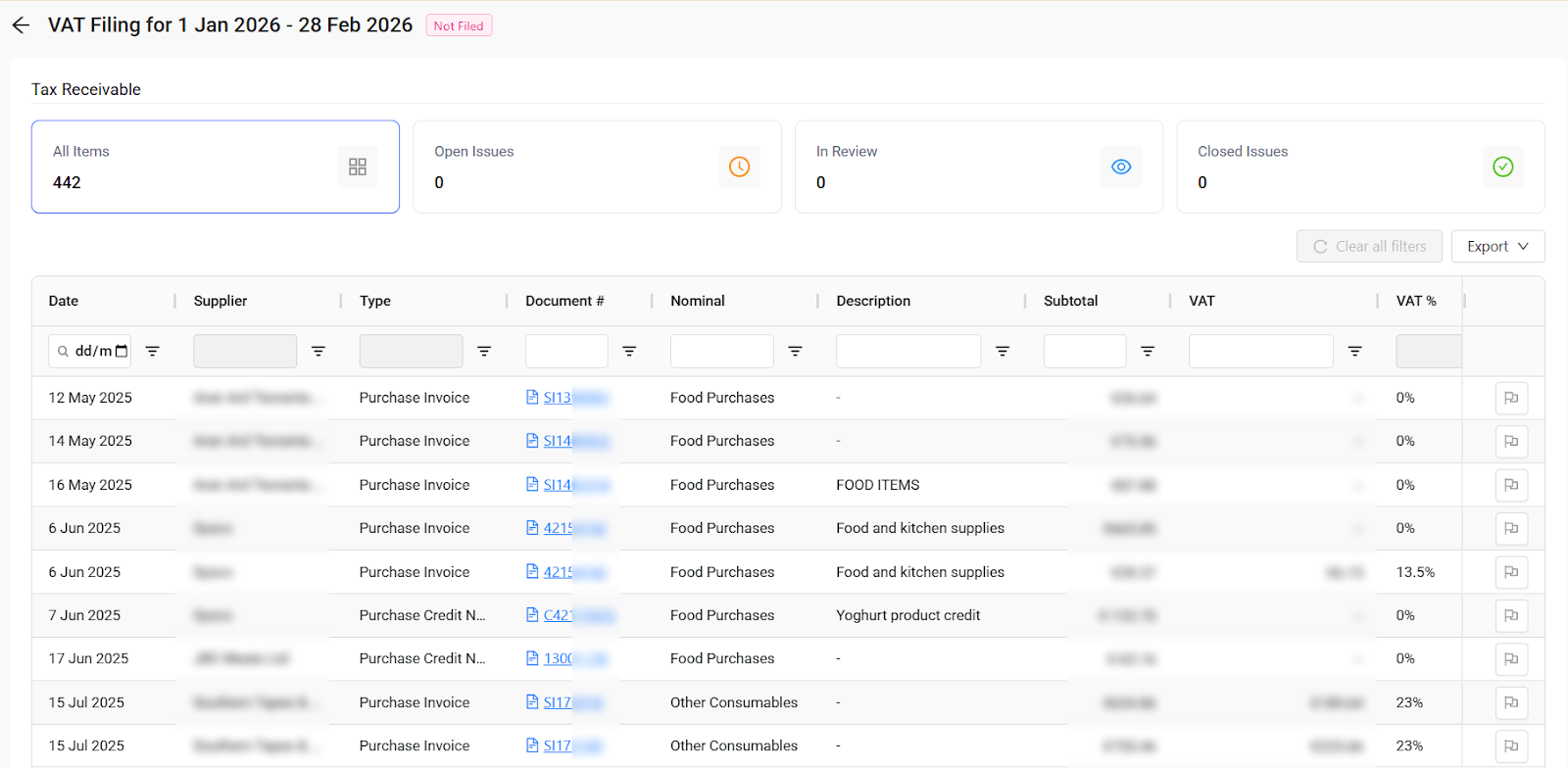
Below that is the full table of every line item contributing to the return. You can view this by supplier (showing date, supplier name, document type, nominal, description, subtotal, VAT amount, and VAT percentage) or by document (showing document number, nominal, description, subtotal, VAT, VAT %, VAT code, and total).
Every item in this table has already been processed by Rex™, our AI engine. The invoices have been read, coded, and posted to the ledger. The VAT treatment has been applied. Your team's job here is to review what Rex has prepared and flag anything that needs a second look.
Every column is filterable. If you want to see only items from a specific supplier, or only items with a particular VAT rate, you can narrow down instantly.
Flagging issues directly in the product
This is one of the features that practice partners have found most valuable in the VAT workflow.
On every line item, there's a flag icon. Click it and a panel opens where you describe the issue. When you submit, the flag goes directly to the Outmin team to action. You can add as much or as little detail as you need.
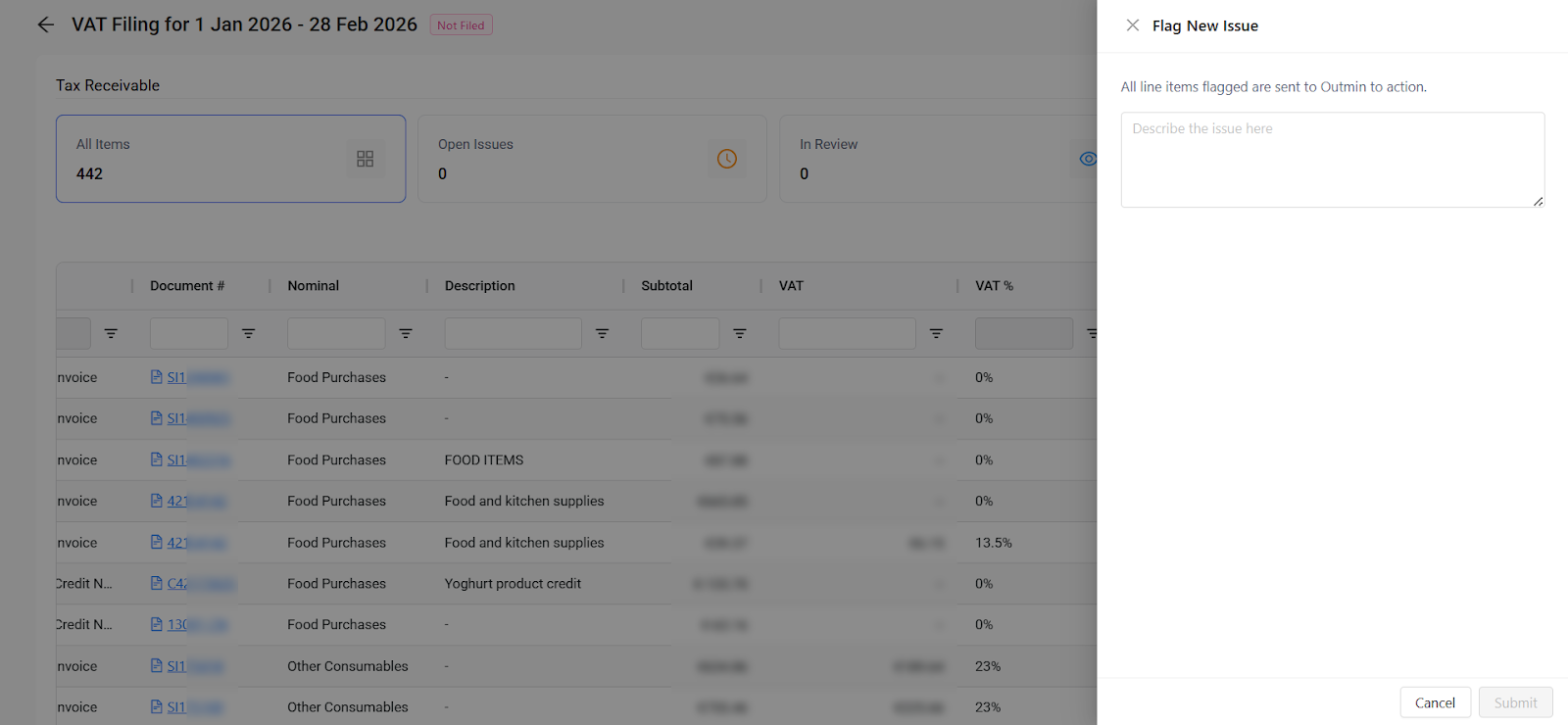
Once flagged, the item moves into Open Issues, which you can filter for at the top of the page. As issues are addressed, they move through In Review to Closed. The entire lifecycle of each flag is tracked in one place.
The ability to do this inside the product, rather than in a spreadsheet or over email, turned out to be one of the most valued parts of the workflow.
Where VAT is heading
What's in Practice View today covers VAT receivable (purchases). This is the side that requires the most review work, and it's where we started.
We're actively building the rest of the VAT workflow:
- VAT payable. VAT on sales, including from POS and eCommerce transactions, is coming next. This will give practices the full picture of both sides of the return.
- Filing summary. A single page showing all VAT totals mapped to the official return fields (T1, T2, etc.), with support for manual adjustments and comments.
- Mark as filed. The ability to close out a period and attach the Revenue receipt directly in Practice View.
The goal is for the entire VAT process, from review through to filing, to happen inside the product. No spreadsheets. No separate tools. Just one workflow.
All Documents: the complete audit trail
If VAT review is about knowing what's going into the return, All Documents is about knowing what's in the system in the first place. VAT, reconciliation, reporting. It all starts with whether the right documents are in the system and processed correctly.
What All Documents shows you
The All Documents tab gives your practice a single, searchable table of every document Outmin has received for a client. This includes documents that were processed, but also those that were excluded or are still pending. Nothing is hidden.
The table is wide and detailed. On the left side, you see:
- Upload date. The exact timestamp the document entered the system.
- Source. How it arrived: Upload, Email, Rex, or Sales Invoicing.
- Uploaded by. Who uploaded the document (for uploads and Rex).
- Email from. Who sent it (for email uploads).
- File name. The original file name, so you can match it to what's on a desktop or in an inbox.
- Type. Purchase Invoice, Sales Invoice, Bank Statement, Supplier Statement, Purchase Credit Note, and others.
- Status. Where the document is in the processing lifecycle. Statuses include Posted To Ledger, Allocated To Bank, Digitised, Ready For Reconciliation, Reconciled, Flagged For Review, and Excluded.
- Date. The document date (distinct from the upload date).
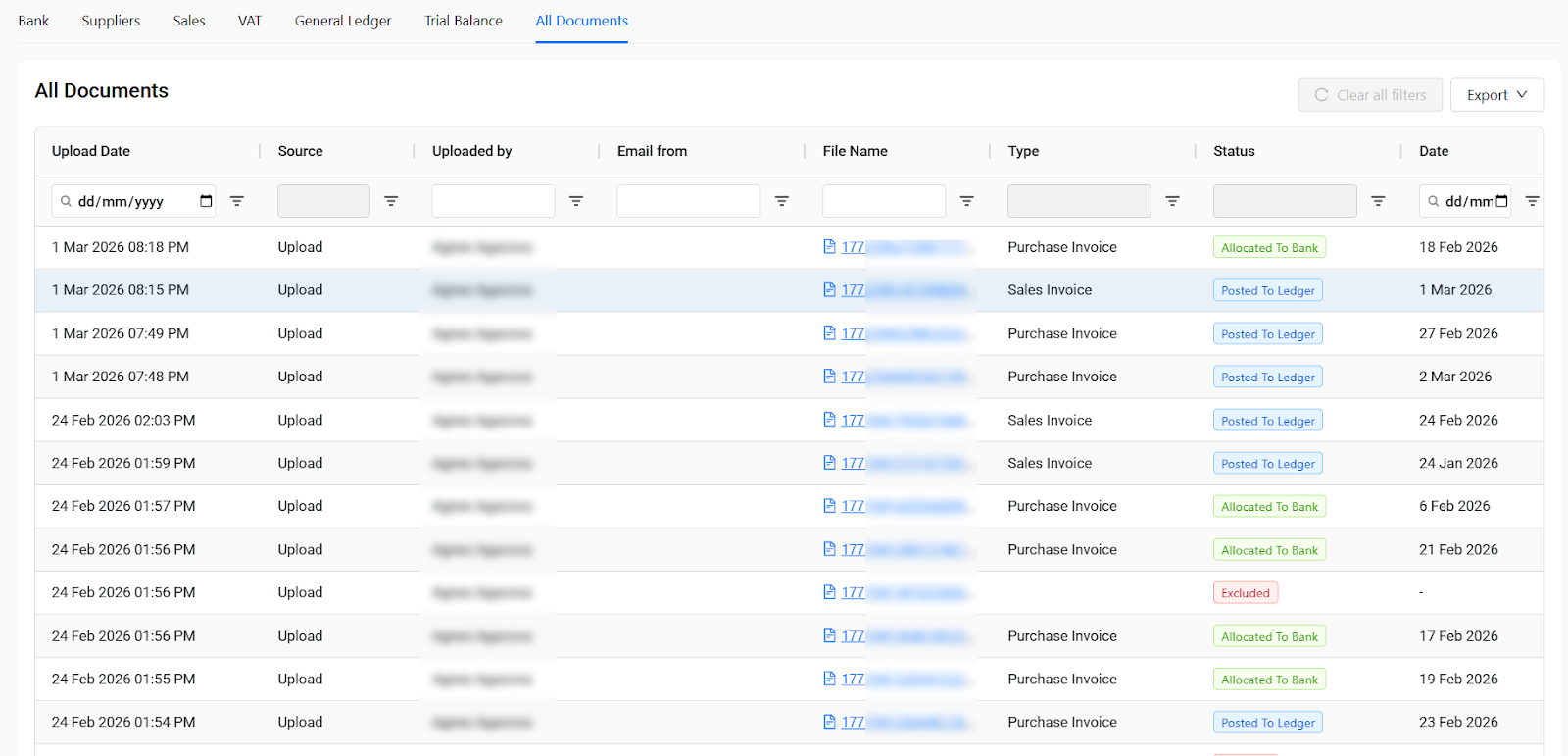
Scroll across the same table and you see:
- Number. Invoice number, where applicable.
- Customer/Supplier. Who the document relates to.
- Note. If a document was excluded, this field explains why. For example: "No invoice no and no date, no bank line."
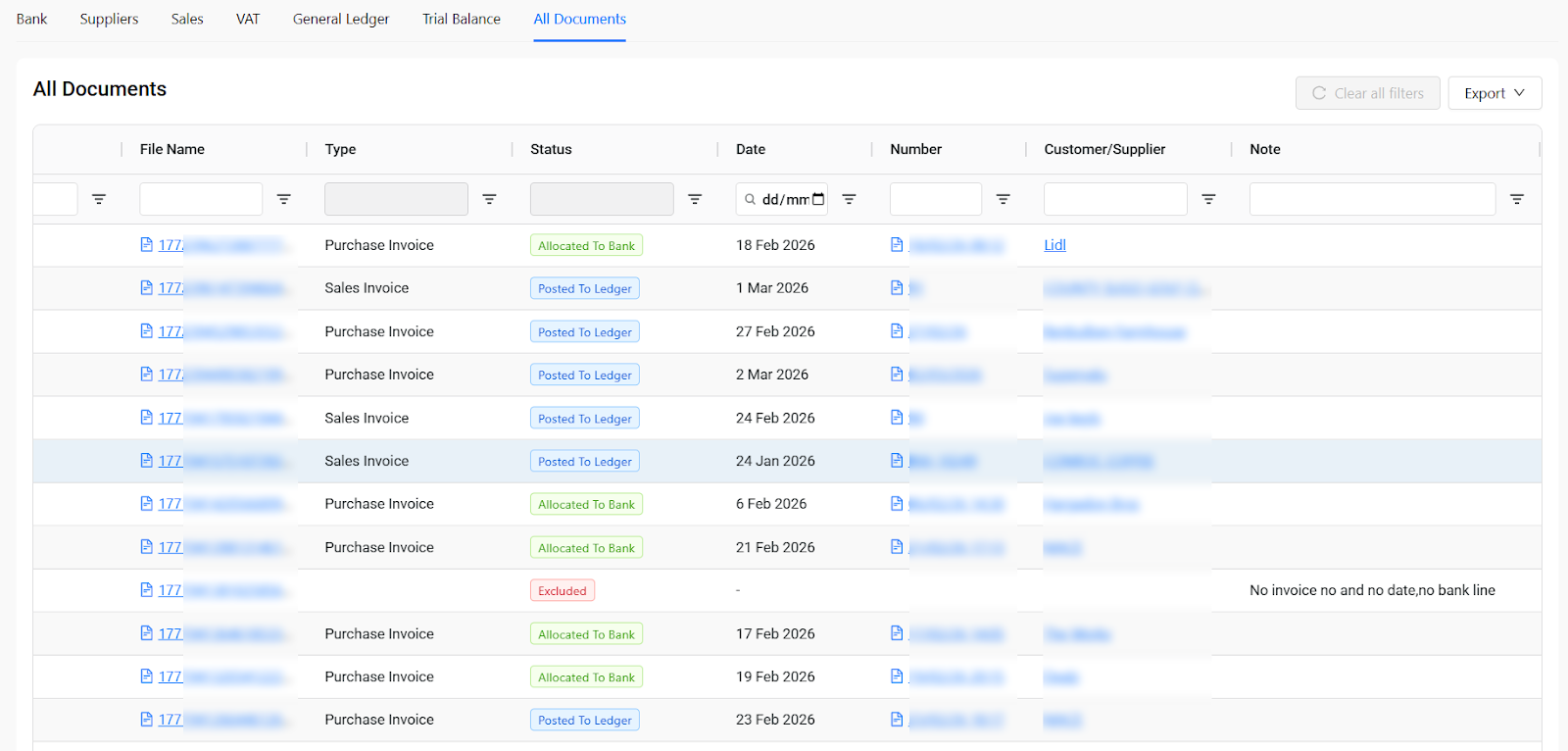
Everything is filterable and exportable. You can search by source, status, type, supplier, date range, or file name.
Why this matters for practices
All Documents serves two purposes. The first is practical: when a client asks "did you receive my invoice?" or "why isn't this in the accounts?", you can answer in seconds. Search by supplier, filename, or date, and you'll find it. If it was excluded, you'll see why.
The second is trust. When your team can trace any number in the ledger back to its source document, the confidence in the overall bookkeeping output increases significantly. That confidence matters when you're signing off on VAT returns, preparing year-end accounts, or responding to a Revenue query.
This is also where the connection between All Documents and VAT becomes clear. Every line item in the VAT return links back to a document. If something in the return looks off, you can trace it back to the source, check how it was classified, and flag it if needed.
The commercial & operational impact
Both VAT review and document traceability change how your practice spends its time:
- Higher-value work. The hours your team spent assembling VAT workings from spreadsheets or chasing missing documents go back to advisory, compliance, and management accounts. That's better margins and a more sustainable workload.
- Faster, more confident filing. When every line item is visible and traceable, your team reviews with confidence instead of spending time double-checking data pulled from multiple sources.
- Fewer client queries left hanging. Document questions that used to require internal follow-up can now be answered immediately.
- Stronger compliance posture. A complete, searchable audit trail with clear statuses and exclusion notes puts your practice in a much better position for any Revenue enquiry.
And as with everything in Practice View, the bookkeeping work behind all of this is being handled by Rex. Your team isn't producing the VAT workings or processing the documents.
They're reviewing the output and stepping in where their judgment is needed. That's a fundamentally different use of their time.
Ready to see what confident VAT filing looks like?
VAT review and All Documents are both available in Practice View as part of the Autonomous Bookkeeping Platform. If you'd like to see how they work, book a demo and we'll walk you through it.