A deep dive into how Practice View gives accounting practices full supplier visibility, reconciliation status, and issue tracking in one place.
Supplier reconciliation is one of those processes that every practice deals with and almost nobody enjoys. Statements arrive at different times. Balances don't always match. And keeping track of what's been reconciled, what's outstanding, and who's responsible for fixing a discrepancy usually means a spreadsheet that gets emailed back and forth until someone finally updates it.
For most practices, this has just been accepted as the way things work.
We built something better. Supplier reconciliation in Outmin now lives entirely inside the product. Rex™, our AI engine, handles the reconciliation work in the background. And Practice View, the practice-facing side of Outmin's Autonomous Bookkeeping Platform, gives your firm full visibility into where every supplier stands, without a spreadsheet in sight.
The spreadsheet problem
Until recently, supplier reconciliation updates were shared with practices through spreadsheets. The practice would review, flag issues, and send comments back. It worked, but the data was static and hard to keep current across a growing client base.
We knew it could be better.
What your practice sees now
When you open any client in Practice View and go to the Suppliers tab, you see a complete overview of every supplier relationship for that client. One table. Every supplier. Everything you need at a glance:
- Aged payables. Outstanding amounts grouped by ageing period: 0–30 days, 31–60, 61–90, and over 90 days.
- Total due. The full outstanding balance across all periods.
- Latest statement. When the most recent supplier statement was received.
- Last reconciliation. When the supplier was last reconciled.
- Reconciliation status. Whether the supplier is fully reconciled, in progress, or not yet reconciled.
- Open issues. How many discrepancies have been flagged.
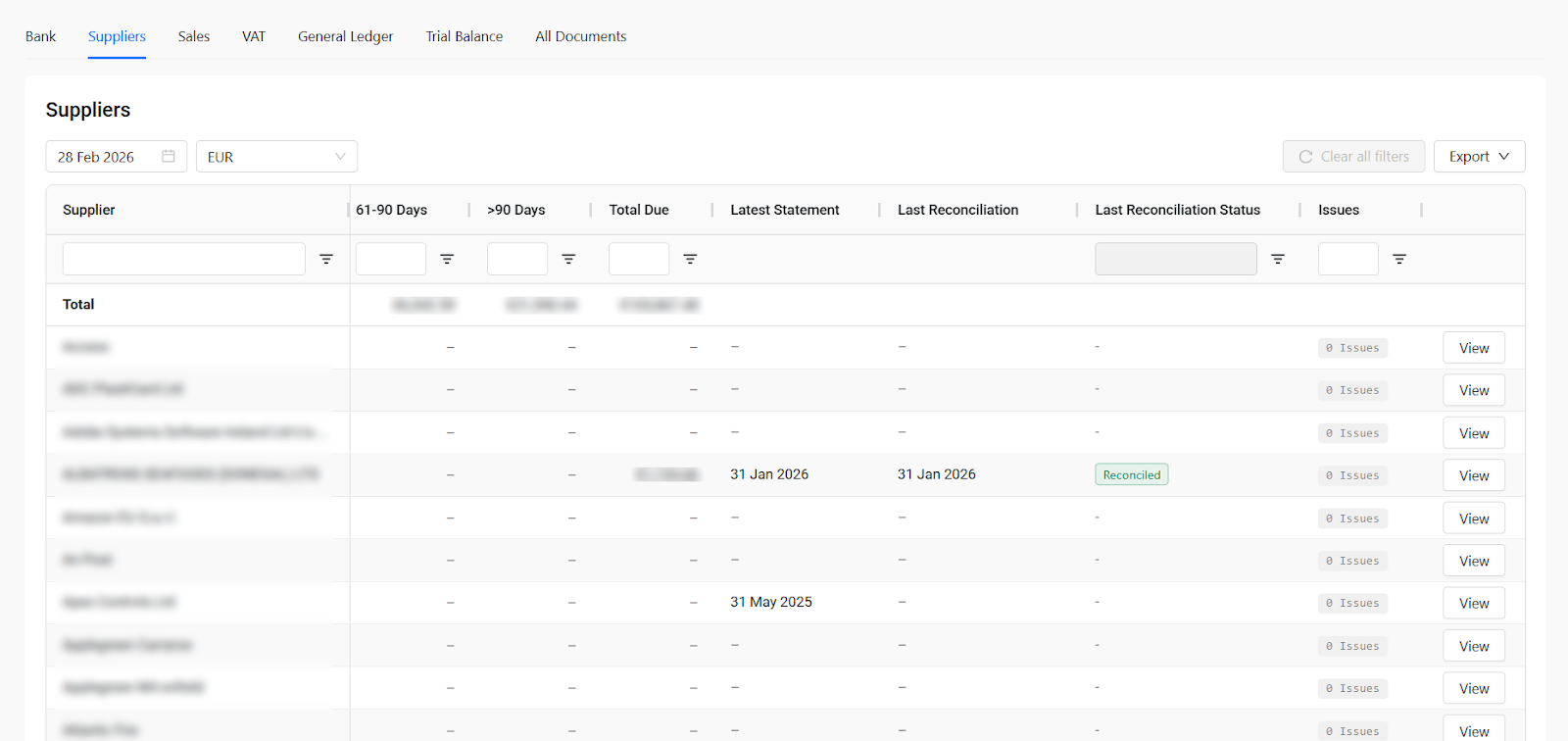
Everything is filterable, sortable, and exportable. You can scan all suppliers in seconds and know exactly which ones are in good shape and which ones need a closer look.
Drilling into a supplier
Click View on any supplier and you go deeper. Inside, there are four tabs:
- Detailed Aged Payables. A full breakdown of what's owed and how long it's been outstanding.
- Reconciliations. The history of all reconciliation activity, including any open issues and who owns them.
- Statements. Every supplier statement Outmin has received, with closing balance, statement balance, Outmin balance, the difference between the two, and reconciliation status. You can view the original document directly from here.
- Pending Transactions. Unprocessed bank lines linked to that supplier.
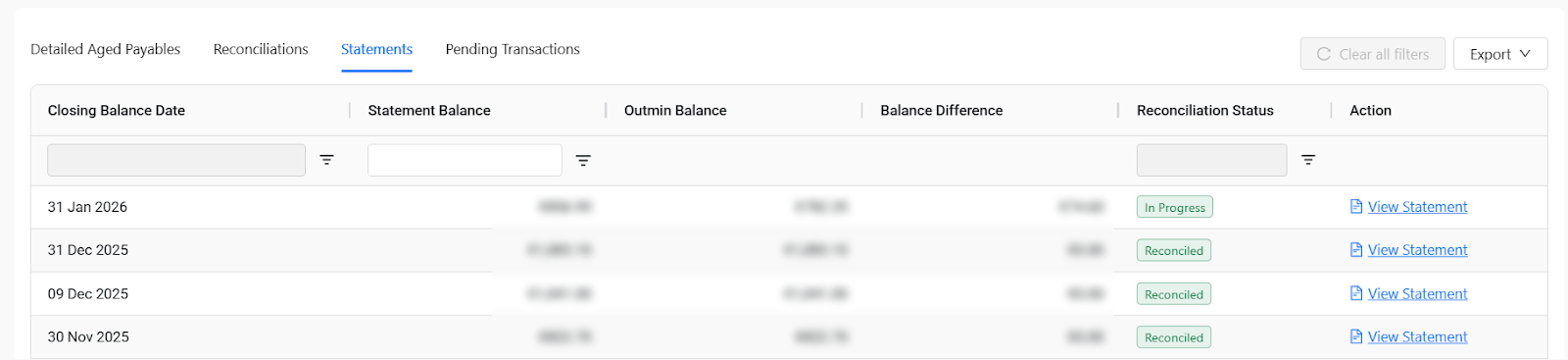
The Statements tab is worth highlighting. For each period, you see the supplier's closing balance side by side with what Outmin has in the ledger. If there's a difference, it's right there. If the reconciliation is in progress, you can see that, too.
And because the full history is preserved, you can look back across months and see how that supplier relationship has been tracking over time.
How Rex handles the work
What the practice sees in Practice View is the output. Behind it, Rex and the Outmin operations team are doing the heavy lifting.
It starts with document collection. Rex acquires supplier documents through three channels:
- Supplier Portal. Outmin logs into supplier portals directly and retrieves invoices and statements.
- Supplier Email. Documents arrive via a dedicated Outmin inbox set up for each client.
- Client Upload. The client uploads documents through the app or by email.
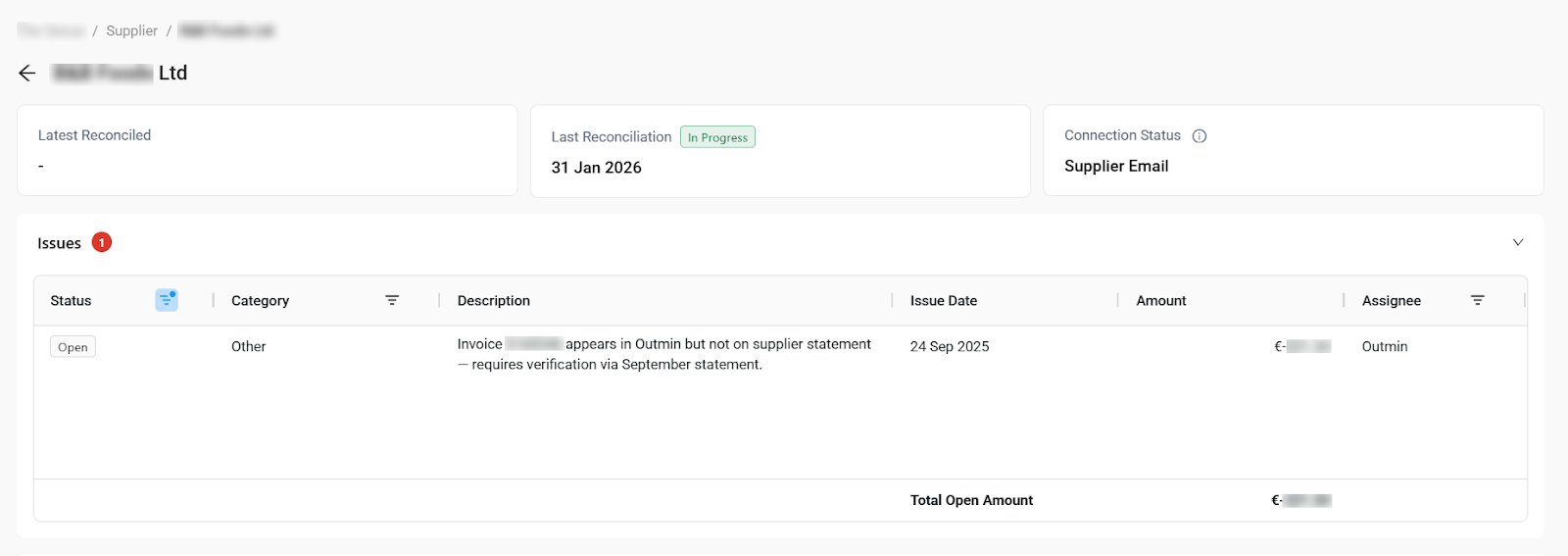
You can see the connection channel for every supplier in Practice View, so you always know how documents are being acquired. When something is missing, you know exactly where the gap is and who's responsible.
Once documents are in the system, Rex processes them: reading invoices, extracting line-level detail, matching them against payments and bank activity. Rex then reconciles the data against the ledger, matching invoices to payments and flagging discrepancies. The Outmin operations team reviews the output and steps in where needed to resolve edge cases and verify accuracy.
When an issue is found, it gets logged with a clear owner. It might be the client, Outmin, or the practice. Everything is tracked inside the product, with a clear record of what's open and what needs to happen next.
What this changes for practices
Moving supplier reconciliation into the product might sound incremental. In practice, the impact is significant:
- More time for higher-value work. The hours your team spent chasing spreadsheets and managing supplier admin go straight back to advisory, compliance, and management accounts. That's better margins and a more sustainable workload.
- More capacity without more headcount. When the reconciliation work is handled by Rex and visible in one place, your team can take on more clients without adding people.
- Faster close cycles. The data is live and the status is always current. No waiting for a file to arrive, reviewing it, and sending comments back.
- Fewer surprises. Issues are tracked as they're found, not discovered at month-end.
- Clear accountability. Every issue has an owner. When something is waiting on the client, you can see it. When it's on Outmin, you can see that too.
But the deeper shift is this: the reconciliation is happening without your team having to drive it. Rex and the Outmin operations team handle the work. Your practice just needs to see where things stand.
That's a fundamentally different way to operate.
What's coming next
Supplier reconciliation in Practice View is already a major step forward, but we're continuing to build. The workflow is getting more automated with every release. We're expanding the ability to communicate on issues directly within the product. And as Rex gets smarter, the volume of issues that require human intervention will continue to shrink.
The goal: a fully digital, continuously updated supplier reconciliation experience where the practice reviews with confidence and Outmin does the heavy lifting.
If you'd like to see how it works, book a demo and we'll walk you through it.